Long YouTube Videos? Help Viewers Skip Straight to What They Want

Let’s be honest, no-one wants to spend 45 minutes scrubbing through a video, dragging that red bar back and forth like they’re looking for a lost sock. If you’re making long YouTube videos that’s precisely what your audience are doing at the moment. The good news is you can fix that with a few simple steps and your audience will be far more likely to watch your videos as a result (they’ll just do it quietly and with a like).
Why Long YouTube Videos Need a Little Navigation Help

(Source – OpenAI)
People don’t tend to watch a long video from beginning to end. They’ll come in with a question in mind such as “How do I change that setting?” or “What’s the best budget camera?” If the answer to that is at 23 minutes in, a lot of people are just going to walk away and go and watch a shorter video.
That hurts your watch time. If people are leaving early then your watch time goes down. Watch time is the total number of minutes that people spend watching your content and YouTube look very closely at that. Low watch time can mean your video is less likely to be seen in the search results and in the recommendations.
When you make it easy to jump around, people stay on your channel longer. They find what they’re looking for and often end up watching more.
👉Click here to see how Boss Wallah works with brands and what we can build for you
Meet YouTube Chapters
YouTube chapters are essentially labelled sections within your video. They’re like the chapters in a book. Each one has a title and you can click on it to jump straight to that section. They also appear as little breaks on the progress bar which makes the video look much neater and more organised.
Chapters help in a few ways:
- Viewers will find the right bit very quickly.
- Your video looks far more professional.
- Google will occasionally show chapters as key moments in the search results, which in turn means more people can discover your video directly.
How to Add Timestamps to Your Video
A timestamp is just a time stamp really, e.g. 02:35 to indicate a particular point in your video. If you list a series of timestamps in your video description, YouTube will turn those into clickable chapters.
Here is how to do it:
- Open up YouTube Studio and select your video.
- Go to the description box.
- Type your first timestamp as 00:00 followed by a title. That one is a must.
- Add at least two more timestamps, each on its own line.
- Save your changes.
Here is a simple example:
- 00:00 Intro
- 01:20 Tools you will need
- 04:45 Step one: setting up
- 12:10 Common mistakes
- 18:30 Final thoughts
A few rules to bear in mind. You’ll need at least 3 timestamps, they have to be in chronological order and each chapter has to be at least 10 seconds. If you skip any of those then YouTube may well ignore your list and that would be a right shame after all the work you’ve put in.
Read More | Meta AI for Product Photography: Can It Replace a Professional Shoot?
Write Chapter Titles People Actually Understand
A chapter title is a micro-headline. Keep it short, clear and straight. “Fixing the blurry audio problem” is vastly superior to “The part where things got weird”. The second is amusing, but absolutely nobody looking for a solution is going to know what the hell it means.
It also helps to use words that your audience would actually type into a search bar. If your video is about baking bread a chapter titled “How to knead dough” is vastly more useful than “Getting my hands dirty”. Clear titles make it far easier for people to scan the list and find the right section.
Use the Pinned Comment as a Backup
Some viewers will never open the description at all. They’ll just go straight to the comments. You can actually exploit that behaviour by pinning a comment to the top with your timestamps in it. A pinned comment is simply one that you’ve chosen to leave at the very top of the comment section.
This gives the viewer a second place where they can find your table of contents (just a list of sections and where they can be found). It takes about 30 seconds to set up and can save a tremendous amount of frustration.
Plan Your Video With Sections in Mind
Chaps work best if your video has a clear structure. Before you go and start recording, just write down the main bits of your video. A simple outline might look like this:
- A short intro that says what the video covers.
- Three to five main sections.
- A quick summary at the end.
When you work in this way your sections are then very easy to label later on. It also stops you wandering off topic which is such a habit we all have when we’re really excited about our own subject.
You can also just say the chapter out loud as you progress. “Right, let’s move on to editing” tells the viewer where they are and gives them a natural point at which to jump in.
Check Your Viewer Retention After You Publish
(Source – OpenAI)
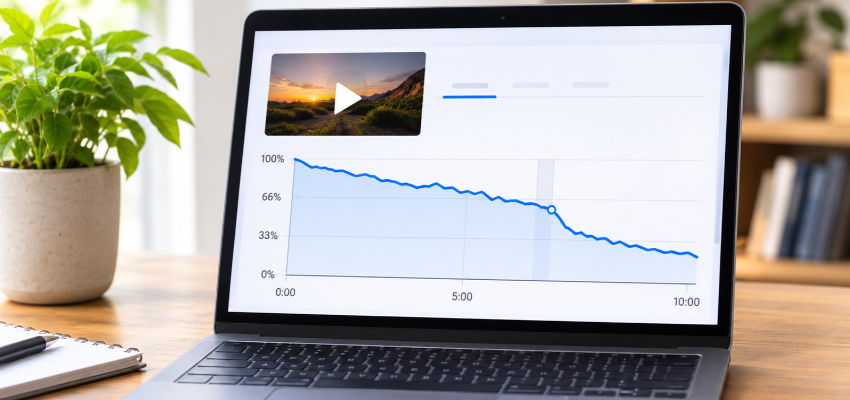
Viewer retention is essentially how much of your video people actually watch. You’ll find it in YouTube Studio under Analytics. It’s a graph with lines going up and down and the dips in the line are where people have dropped off.
Use that to improve your next video. If loads of people are dropping off at the 5 minute mark then look at what’s happening there. Either the topic was dragging or the sound was awful. Next time either tighten that section up or give it it’s own chapter so people can skip it if they want.
Read More | YouTube subtitles and captions: why are they important for your videos?
Need Videos, Creators, or Regional Content for Your Brand?
Boss Wallah helps brands plan and execute video content at scale, without managing multiple vendors.
We work with companies to:
- Shoot large volumes of short-form videos using real creators and studio setups, suitable for social media, websites, campaigns, and launches
- Adapt the same videos for different languages, regions, and platforms, so one shoot works across India and global markets
- Launch products or campaigns through dozens or hundreds of creators, all managed, tracked, and reported in one system
- Support brands with ongoing content, launches, regional expansion, and performance-focused campaigns
Whether you need videos for a new launch, content for multiple markets, creator-led visibility, or a steady content pipeline, Boss Wallah acts as a single partner handling production, creators, and execution end-to-end.
👉Click here to see how Boss Wallah works with brands and what we can build for you
Final Thoughts
If you’re making long YouTube videos then you don’t need to cut them off in the middle to keep people watching. You just need to give them a map. Add timestamps, write clear chapter headings, pin a comment and plan out your sections prior to filming. Your viewers will be able to find what they’re looking for much more easily and you’ll probably see better watch time as a result.
Your audience have a limited amount of time and plenty of other videos to choose from. Make it easy for them to stay.
Frequently Asked Questions
1. What’s the ideal length for a YouTube video with chapters?
There’s no such thing as a perfect length. Chapters work really well for any video that’s over about 5 minutes in duration (tutorials, interviews, reviews etc). If your video is longer than 10 minutes then chapters are definitely recommended.
2. Do I need any special software in order to add chapters?
No, you just need to type in the timestamps into your video description via YouTube Studio. It’s free and it only takes a few minutes.
3. Why aren’t my chapters appearing?
The most frequent reasons are either a missing 00:00 start time stamp, less than 3 time stamps or chapters that are less than 10 seconds in length. Check that the timestamps are in order and that the chapters haven’t been turned off for that video.
4. Can I add chapters to videos that I’ve already published?
Yes. Open the old video in YouTube Studio, edit the description, and add your timestamps. This is a great way to give older long videos a fresh boost.
5. Do chapters really help with search visibility?
They can. Chapters may appear as key moments in Google search, and they improve the viewing experience, which can lead to better watch time. Nothing is guaranteed, but they certainly do not hurt.