Instagram Alt Text: How to Write Better Image Descriptions for Your Posts
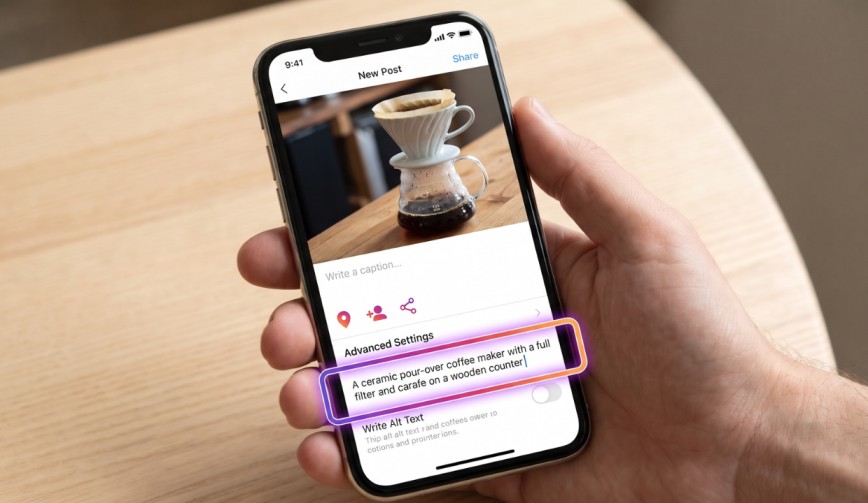
When someone scrolls through Instagram, they usually see photos, videos and captions. But what about people who cannot see the images? This is where Instagram alt text becomes important.
Alt text is a short description that explains what is shown in a photo. It helps people who use screen readers understand the images in your posts. Instead of missing out on the visual content, they can listen to a description and get a better idea of what you have shared.
You might have seen the option to add alt text while uploading a photo and simply skipped it. That is quite common. But taking a few extra seconds to write a description can make your content more accessible and easier to understand.
Let’s look at what Instagram alt text is, why it matters and how you can write descriptions that actually help people.
What Is Instagram Alt Text?
(Source – OpenAI)
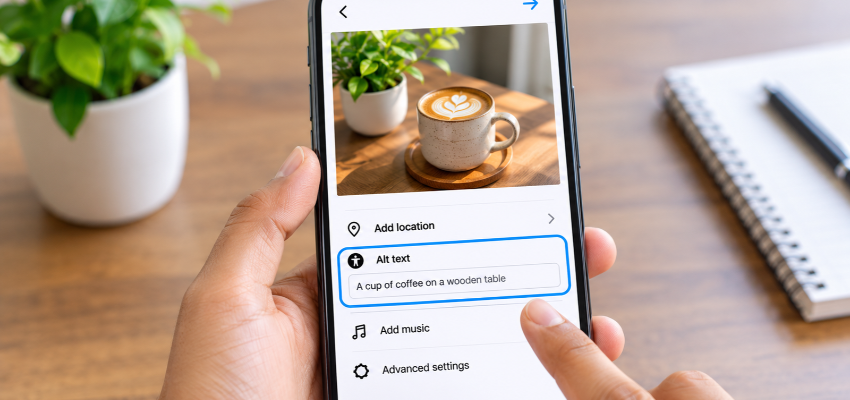
Instagram alt text is a written description of an image. It is mainly designed to help people who are blind or have low vision understand the photos they cannot see.
When someone uses a screen reader, the software reads out the content on their screen, including the alt text you add to your photos. If you leave it blank, the screen reader may only announce something like “Photo by username.” That does not really tell the person much about what you have shared.
Alt text is also useful when an image fails to load. Instead of seeing an empty space, people can still get an idea of what the picture is about.
👉Click here to see how Boss Wallah works with brands and what we can build for you
Why Instagram Alt Text Matters
Adding alt text might seem like a small detail, but it makes a difference in a few ways.
1. It makes your content accessible to more people.
Not everyone experiences Instagram in the same way. Some people use screen readers to understand what is on their screen. A clear description helps them picture what you have shared.
For example, if you post a photo of a birthday cake, your alt text can describe its colours, decorations and other details.
2. It may help people discover your content.
Instagram uses information from posts to understand what they are about. Adding relevant descriptions may help the platform understand your images better. It can also support your Instagram SEO efforts.
SEO simply means making your content easier to discover when people search for something.
3. It creates a better impression of your brand.
People notice the little things. When creators and businesses take the time to add alt text, it shows that they have thought about different audiences. It is a simple way to make your content more welcoming and build trust with your followers.
Read More | 500 Likes on Instagram: What Your Post Engagement Rate Says About Your Content.
How to Add Alt Text on Instagram
Adding alt text does not take much time. You can do it while uploading a new photo.
- Choose the photo you want to post and make your usual edits.
- On the screen where you add your caption, scroll down and tap Advanced settings.
- Look for Write alt text and open it.
- Add a short description of your photo and save your changes.
- Share your post as usual.
What if you have already shared the post? You do not need to upload it again.
Open the post, tap the three dots, select Edit, and look for the alt text option. You can update the description without affecting your existing caption.
What Should You Actually Write?
The easiest way to write good alt text is to imagine explaining your photo to a friend over a phone call. What would you tell them so they could picture it?
A useful image description should include details such as:
- Who or what is in the picture: Mention the main person, object, animal or subject.
- What is happening: Describe the action or activity.
- Where it is happening: Include the location or background if it adds useful information.
- Any visible text: If your image contains important words, include them in your description.
You do not need to write a long paragraph. One or two clear sentences are usually enough. Around 125 characters is a useful guideline, but do not leave out important details just to meet a character limit.
Examples of Good and Not-So-Good Alt Text
Let’s look at a couple of examples to make this easier.
Not so good: “Dog.”
Better: “A golden retriever sleeping on a grey sofa with a chewed slipper beside him.”
The second description gives the reader a much clearer idea of what the photo looks like.
Here is another example.
Not so good: “Coffee.”
Better: “A latte with heart-shaped foam art on a wooden table beside an open notebook.”
That is what good descriptive alt text should do. It helps someone understand the image without adding unnecessary details.
Instagram Alt Text vs Captions
Alt text and captions may seem similar, but they serve different purposes.
Your Instagram captions are where you share your thoughts, tell a story, add a little humour or ask your followers to take action. They are meant for everyone who reads your post.
Alt text has a different job. It describes what someone can actually see in the image.
For example, imagine your caption says, “Sunday vibes and too many pancakes.”
Your alt text could be, “A stack of pancakes topped with strawberries and syrup on a white plate.”
There is no need to repeat your caption in the alt text box. Each has its own purpose.
Also, avoid adding hashtags or stuffing keywords into your description. A screen reader reads the alt text aloud, so a list of hashtags can make the experience confusing. Keep it natural and focus on describing the image.
Read More | Top 10 Influencer Fraud Detection Strategies to Help Brands Run Safer Campaigns.
Common Mistakes to Avoid

(Source – magnific.com)
Even when people remember to add alt text, a few small mistakes can make their descriptions less useful.
Here are some things to watch out for:
- Starting with “Image of” or “Photo of”: You can skip these words because screen readers already identify the content as an image.
- Writing descriptions that are too vague: Saying “Beautiful scenery” does not explain much. Mention what is actually visible.
- Adding too many details: Focus on the main subject. You do not need to describe every small object in the background.
- Ignoring text inside images: If you share a promotional graphic or infographic, include important text in the description.
- Forgetting carousel slides: If your post contains multiple photos, remember to add a separate description for each image.
What About Instagram’s Automatic Alt Text?
You might have noticed that Instagram can generate alt text automatically. It uses artificial intelligence (AI) to recognise objects and other details in your photos.
This is helpful when you forget to add your own description. However, automatic descriptions do not always understand the full context of an image.
For example, Instagram might describe a picture as “Two people outdoors.” But the actual photo could show a couple celebrating their wedding on a rooftop.
That is quite a difference, isn’t it?
Writing your own alt text gives you more control over what people hear. You can include the details that automatic descriptions might miss.
A Simple Habit Worth Building
You do not need to spend several minutes thinking about the perfect description every time you post.
Before sharing a photo, just ask yourself: “If someone could not see this picture, what would I tell them about it?”
Write down the answer in one or two sentences. That is usually all you need.
Once you get into the habit, adding alt text will become just another part of preparing your Instagram post, like choosing a caption or checking your hashtags.
Need Videos, Creators, or Regional Content for Your Brand?
Boss Wallah helps brands plan and execute video content at scale, without managing multiple vendors.
We work with companies to:
- Shoot large volumes of short-form videos using real creators and studio setups, suitable for social media, websites, campaigns, and launches
- Adapt the same videos for different languages, regions, and platforms, so one shoot works across India and global markets
- Launch products or campaigns through dozens or hundreds of creators, all managed, tracked, and reported in one system
- Support brands with ongoing content, launches, regional expansion, and performance-focused campaigns
Whether you need videos for a new launch, content for multiple markets, creator-led visibility, or a steady content pipeline, Boss Wallah acts as a single partner handling production, creators, and execution end-to-end.
👉Click here to see how Boss Wallah works with brands and what we can build for you
Final Thoughts
Instagram alt text may not be the first thing you think about when publishing a post, but it is worth the extra few seconds.
It helps people who use screen readers understand your photos, makes your content more accessible and gives Instagram additional context about what you are sharing.
You do not need complicated descriptions or special writing skills. Just describe what is in the picture clearly and naturally.
The next time you upload a photo, take a moment to fill in that alt text box. It is a small effort that can make your content easier for more people to enjoy.
Frequently Asked Questions
1. Is alt text required on Instagram?
No, Instagram does not require you to add alt text. However, it is a good practice because it makes your photos easier to understand for people who use screen readers.
2. How long should Instagram alt text be?
Try to keep it to one or two clear sentences. Around 125 characters is a useful guideline, but you can write a little more if the image needs additional explanation.
3. Can I add alt text to Reels or Stories?
Instagram’s alt text feature is mainly available for photo posts and carousel images. For Reels and Stories, adding captions and subtitles can make your video content easier to follow.
4. Does alt text help with Instagram SEO?
Alt text may help Instagram understand what your images contain. This can support your discoverability, but it does not guarantee better rankings or more reach.
5. Should I put hashtags in my alt text?
No. Keep hashtags in your caption or comments. Alt text should describe the actual image in simple, natural language.