Mastering Instagram Growth Using the Professional Dashboard Features

What is Instagram’s Professional Dashboard?
(Source – OpenAI)
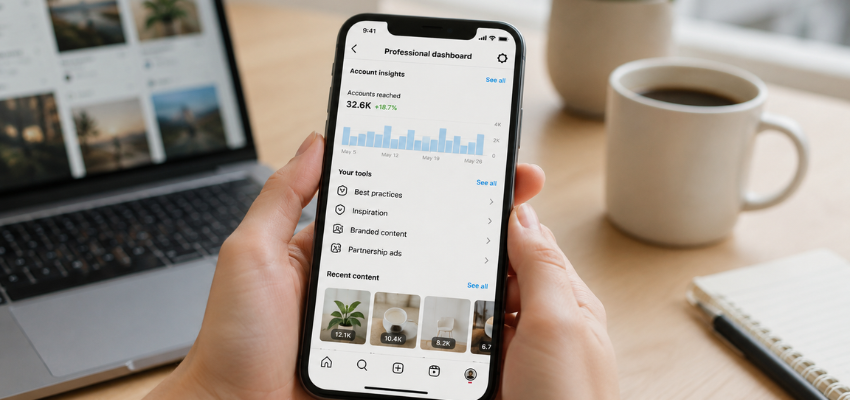
The professional dashboard Instagram created serves as a central hub that unites all key tools and metrics for content creators and businesses. Here’s what you should know about this powerful feature:
What is Instagram’s Professional Dashboard?
- A central control centre that shows your performance stats, growth tools, and learning resources
- An easy-to-use interface that tracks progress and optimises your Instagram strategy
- A quick solution that puts all app sections in one place
How to access the professional dashboard on Instagram
You can reach your professional dashboard on Instagram easily:
- Open your Instagram app and go to your profile
- Look for the “Professional Dashboard” button directly above your posts
- Tap on it to enter the dashboard interface with all available tools and insights
- You can also find it through the hamburger menu in your profile’s top-right corner
Who can use the dashboard: creator vs business accounts
Your account type determines dashboard access:
- Business accounts: Complete access to all dashboard features, including detailed analytics and shopping tools
- Creator accounts: Full access with emphasis on content performance and audience insights
- Personal accounts: No dashboard access (switching to business or creator account required)
Why Instagram launched this feature
Instagram built this feature to:
- Give professional users a smooth experience while managing their presence
- Support growing businesses and creators with centralised tools
- Show users clear performance metrics and audience data
- Make growth resources and more accessible monetisation opportunities
- Address user feedback about needing a more connected management interface
The professional dashboard Instagram developed shows its steadfast dedication to supporting content creators and businesses. Instagram makes it easier for professionals to grow their presence and boost their impact by combining metrics, tools, and educational content in one place.
👉Click here to see how Boss Wallah works with brands and what we can build for you
Tracking Your Performance: Analytics That Matter
Live analytics are the foundations of any successful Instagram strategy. The professional dashboard Instagram offers vital data that helps measure your results and fine-tune your approach. These metrics matter most:
Accounts reached and impressions
- Accounts reached: Number of unique accounts that see your content at least once
- Impressions: Total views your content receives (including multiple views from the same person)
- Your content performs well when impressions exceed reach, which shows users view your posts multiple times
- Smaller accounts (under 50K followers) see better results with Reels, while larger accounts perform better with carousels
Content interactions: likes, shares, comments
- Likes, comments, shares, and saves help you understand your audience’s response
- Carousels lead to more saves regardless of account size
- Comments flow more freely on Reels for pages of all sizes
- Instagram’s current average sits at 0.50%, down 28% from the last engagement rate
Audience insights: age, gender, location
- Your audience’s demographic details appear in the “Total followers” section with age, gender, and location data
- Peak activity times show when your followers browse Instagram the most
- Location insights let you customise content for specific regions and optimise posting schedules
- Instagram users split almost evenly worldwide – 50.6% male and 49.4% female
Top-performing content breakdown
- Your best posts reveal themselves through reach and engagement metrics
- Different content types (Reels, carousels, images) appeal to audiences differently
- Patterns emerge in topics, formats, and optimal posting times
- Carousels lead engagement rates at 0.55%, with Reels at 0.50% and images at 0.45%
How to use insights to improve content strategy
- Create more content similar to your highest-performing posts
- Your content visibility improves when you post during peak activity hours
- Your audience’s demographic data helps shape more relevant messages
- Different content formats need testing to optimise your strategy
Read More | Free Instagram Monetise Strategies That Turn Attention Into Income.
Tools to Grow Your Business on Instagram
The professional dashboard Instagram interface provides specialised tools that help you discover the full potential of your Instagram growth. These platform features are designed to help businesses succeed in the digital world.
Branded content tools and approvals
- The paid partnership label creates transparency for compensated content
- Your profile menu under /Creator tools lets you enable branded content tools for Business
- You can set approval requirements before creators tag your business
- Brand safety improves with the review and management of tagged content
Instagram Shopping and product tagging
- Feed posts, carousels, and reels support tagging up to 20 products
- Customers shop seamlessly without leaving the platform
- Creators expand your product reach through product tagging features
- Shoppable posts gain more visibility through boosting
Badges and monetisation eligibility
- Instagram Live broadcasts generate revenue through viewer-supported badges
- Badge eligibility requires 10,000+followers
- Professional accounts meeting requirements can access subscription features at age 18+
- Badge earnings become available after reaching $100
Quick replies and saved responses
- Direct messages become efficient with shortcuts for common questions
- Your message interface displays up to four frequently asked questions
- Quick replies support 20 characters each with a 13-reply limit
- Standard responses save time when answering common questions
Ad tools and IGTV promotions
- Profile-based post boosting extends your content reach
- Goals include increasing profile visits, website traffic, or messages
- IGTV ads run for 15 seconds in pre-roll, mid-roll, or post-roll positions
- Ads Manager provides targeting options and placement selection
Educational Resources and Staying Informed
Your professional dashboard on Instagram does more than track metrics and tools. It works as a learning hub that keeps your content strategy fresh and impactful.
Tips and best practices from Instagram
The dashboard features “best practices,” a dedicated educational hub that gives you:
- about when to post and how to grab attention Content creation insights
- Ways to connect with your audience and understand metrics better
- Simple explanations about algorithms and growing your followers
- Clear details about making money on Instagram
- Help to understand community standards and policies
Instagram also offers individual-specific tips and educational reels where successful creators share what they’ve learned.
Instagram Guides and curated content
Instagram Guides work like mini-blogs right on the platform:
- You can create scrollable, curated collections of content
- Three options are available: Places (for locations), Products (for shopping), and Posts (for content curation)
- These work great for gift guides, product spotlights, or teaching content
- You’ll find them through the plus icon on your profile page
Learning from similar creators and businesses
The dashboard helps you learn from others through:
- Quality posts and ads from businesses like yours that spark ideas
- Curated content from Instagram’s @creators and @instagramforbusiness teams
- Updates and key tips from @Creators
How to stay updated with trends using the dashboard
Keeping up with changes becomes easier:
- The Stay Informed section shows you the latest best practices
- Educational reels in your dashboard reveal trending content strategies
- Articles about planning and creating content are right at your fingertips
Benefits of using the Professional Dashboard

(Source – magnific.com)
The professional dashboard Instagram provides brings real value to creators and businesses. Here are the main benefits you’ll get:
- Time efficiency – A single location houses all your essential tools. You’ll spend less time switching between sections and more time creating content.
- Informed decisions – Detailed analytics help you make smart choices based on actual performance numbers instead of guesswork.
- Revenue optimisation – Clear visibility of money-making features lets you earn more through badges and branded content.
- Simplified growth tracking – Your account’s progress appears clearly on one screen, making it easy to monitor growth.
- Professional credibility – The dashboard shows potential partners that you mean business on Instagram. This can lead to more collaboration opportunities.
- Learning acceleration – Quick access to learning resources helps you master platform features and stay updated with best practices.
- Competitive edge – Knowledge about your best-performing content helps you outperform rivals by focusing on what appeals to your audience.
- Better audience connection – Demographic insights help create customised content that speaks to your followers’ interests.
- Strategic planning – Past performance data helps build better content calendars and campaigns based on what worked before.
- Platform optimisation – Official tools help you use Instagram as intended and maximise your reach within the algorithm.
Read More | 1000 Free Instagram Followers Without Chasing Viral Reels.
Key Takeaways
Instagram’s Professional Dashboard centralises all essential tools for creators and businesses, transforming how you manage and grow your Instagram presence professionally.
- Access comprehensive analytics in one place – Track accounts reached, impressions, engagement rates, and audience demographics to make data-driven content decisions.
- Leverage built-in business growth tools – Use Instagram Shopping, branded content features, quick replies, and monetisation options like badges to turn followers into revenue.
- Save time with centralised management – All performance metrics, growth tools, and educational resources are consolidated in one dashboard, eliminating navigation between multiple app sections.
- Stay competitive with educational resources – Access Instagram’s official best practices, tips from successful creators, and platform updates to keep your strategy current and effective.
- Qualify for monetisation opportunities – Meet eligibility requirements for badges (10,000+ followers), subscriptions, and other revenue streams directly through the dashboard interface.
Need Videos, Creators, or Regional Content for Your Brand?
Boss Wallah helps brands plan and execute video content at scale, without managing multiple vendors.
We work with companies to:
- Shoot large volumes of short-form videos using real creators and studio setups, suitable for social media, websites, campaigns, and launches
- Adapt the same videos for different languages, regions, and platforms, so one shoot works across India and global markets
- Launch products or campaigns through dozens or hundreds of creators, all managed, tracked, and reported in one system
- Support brands with ongoing content, launches, regional expansion, and performance-focused campaigns
Whether you need videos for a new launch, content for multiple markets, creator-led visibility, or a steady content pipeline, Boss Wallah acts as a single partner handling production, creators, and execution end-to-end.
👉Click here to see how Boss Wallah works with brands and what we can build for you
Conclusion
Instagram’s Professional Dashboard is changing the game for creators and businesses who want to succeed on the platform. This powerful hub brings everything you need in one place to take your Instagram presence from casual to professional.
The dashboard gives you quick access to key analytics that show what works best. You can make better content decisions based on actual data instead of guessing. Having all your metrics – accounts reached, content interactions, and audience details – in one spot saves you time. This means more hours to create content that connects with your audience.
FAQs
It’s a centralised hub for creators and businesses that provides analytics, monetisation tools, and learning resources to grow on Instagram.
Business and creator accounts have full access, while personal accounts must switch to professional to use it.
Open Instagram → Go to your profile → Tap on Professional Dashboard above your posts, or access it via the hamburger menu.
You can track reach, impressions, engagement (likes, comments, shares, saves), and audience demographics like age, gender, and location.
Yes, it shows monetisation eligibility and enables revenue through badges, branded content, and subscriptions.
Yes, the dashboard highlights top-performing content such as Reels, carousels, or images based on engagement.
Features include branded content approvals, Instagram Shopping, product tagging, ads, quick replies, and IGTV promotions.
You’ll find best practices, educational reels, Instagram Guides, curated content, and updates from @creators and @instagramforbusiness.
It centralises all analytics, tools, and educational resources in one place, eliminating the need to switch between multiple app sections.
It helps creators and businesses make data-driven decisions, optimise revenue, build credibility, and stay competitive with trends.